

Latest Version
4 Build 4192
May 18, 2025
Sublime HQ Pty Ltd
Tools
Windows
21MB
25
Free
Sublime
Report a Problem
More About Sublime Text
Sublime Text: The Fast, Powerful, and Lightweight Code Editor
In the world of coding, choosing the right text editor can significantly impact productivity and efficiency. Among the many options available, Sublime Text stands out for its lightweight design, blazing speed, and powerful features. Whether you’re a beginner learning to code or an experienced developer working on large projects, Sublime Text provides a customizable and intuitive environment tailored to your needs.
What Is Sublime Text?
Sublime Text is a sophisticated text and source code editor widely used by developers for programming, scripting, and markup. Initially released in 2008 by Jon Skinner, Sublime Text was designed to offer a fast, distraction-free editing experience with an emphasis on efficiency. The software is compatible with Windows, macOS, and Linux, ensuring developers can use it across various operating systems.
Unlike traditional IDEs, Sublime Text focuses on speed and simplicity, eliminating unnecessary bulk while maintaining a robust set of features essential for coding.
Why Developers Choose Sublime Text
1. Lightweight & Blazing Fast Performance
One of Sublime Text’s standout features is its speed. Unlike resource-heavy IDEs, Sublime Text loads almost instantly and operates smoothly, even when handling large code files. It consumes minimal system memory, making it an ideal choice for developers working on multiple projects simultaneously.
2. Multi-Language Support
Sublime Text supports a vast array of programming languages, including Python, JavaScript, C++, HTML, CSS, PHP, and many more. Whether you're working on front-end development, back-end scripting, or data analysis, Sublime Text ensures compatibility with various coding environments.
3. Distraction-Free Mode for Focused Coding
Sublime Text offers a Distraction-Free Mode, removing unnecessary UI elements to help developers concentrate solely on their code. This feature is particularly beneficial for writing and debugging complex algorithms without distractions.
4. Powerful Plugin System
With Sublime Text’s Package Control, users can install plugins to enhance functionality. Some popular extensions include:
- Emmet (for faster HTML & CSS coding)
- SublimeLinter (for error detection)
- Git (integrating version control)
- BracketHighlighter (for managing nested code structures)
These plugins help automate repetitive tasks and streamline the development workflow.
5. Intuitive Keyboard Shortcuts & Commands
Efficiency is key in programming, and Sublime Text provides keyboard shortcuts to speed up coding. The Command Palette enables quick access to frequently used commands without navigating through menus, allowing developers to work seamlessly.
6. Multiple Selections & Editing
A unique feature of Sublime Text is Multiple Selections, which enables users to edit multiple lines of code at once. Whether you're renaming variables or making bulk edits, this feature enhances productivity and minimizes time spent on manual updates.
7. Syntax Highlighting & Code Folding
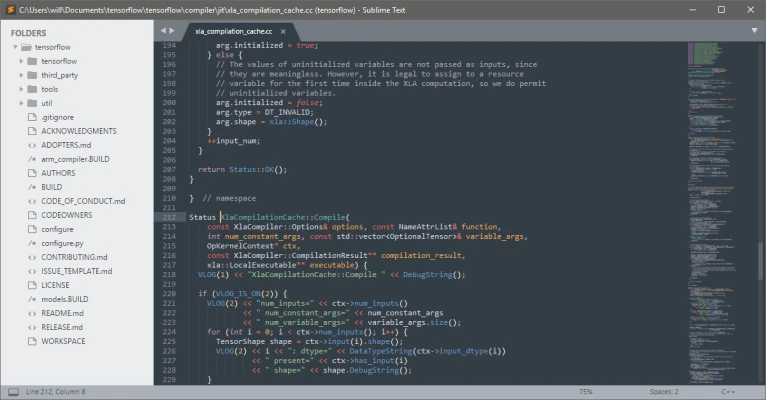
Sublime Text offers syntax highlighting, making code visually organized and easy to read. Additionally, developers can use code folding to collapse sections of code for better navigation—ideal for working with large projects.
8. Customizable Interface & Themes
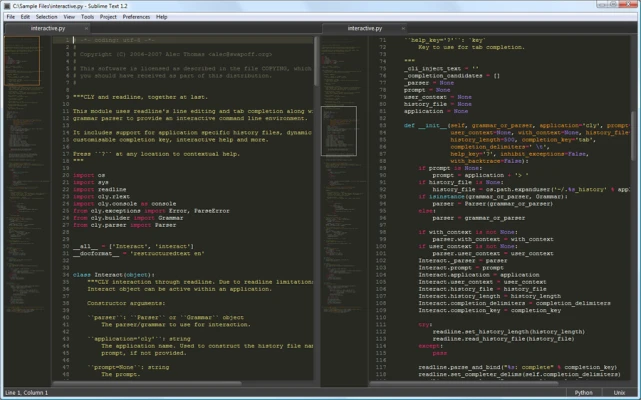
Developers can personalize themes, color schemes, and UI elements to create an editor tailored to their preferences. Whether you prefer a dark mode interface or a vibrant theme, Sublime Text allows customization for a more enjoyable coding experience.
9. Built-in Python API for Advanced Customization
Sublime Text’s Python-based API allows users to create custom commands, automate tasks, and build extensions, making it one of the most adaptable text editors available.
How Sublime Text Enhances Developer Productivity
Quick & Efficient Project Management
Sublime Text enables easy file switching and split editing, allowing developers to work on multiple files simultaneously. The Goto Anything feature lets users quickly locate files, functions, and symbols, speeding up navigation.
Seamless Integration with Development Tools
While Sublime Text is lightweight, it integrates seamlessly with essential development tools like Git, Docker, Node.js, and AI-driven debugging assistants, making it a preferred choice for professional developers.
Regular Updates & Active Community Support
Sublime Text receives consistent updates with new features, bug fixes, and security improvements. Its strong community ensures developers have access to forums, tutorials, and extensive documentation.
Is Sublime Text Free?
Sublime Text follows a shareware model, allowing users to evaluate it for free without a time limit. However, a paid license is required for continued use and access to advanced features.
Pricing Model
- Free trial (unrestricted for testing)
- One-time purchase license for individual users
- Business licenses available for teams and enterprises
Unlike subscription-based software, Sublime Text’s one-time licensing fee makes it an affordable long-term investment.
Conclusion
Sublime Text continues to be one of the best text editors for developers seeking a lightweight, fast, and feature-rich coding environment. Whether you’re a beginner or an experienced programmer, its customizability, multi-language support, and powerful extensions make it an essential tool for boosting coding efficiency.
📌 Ready to supercharge your coding experience? Download Sublime Text today and discover why developers worldwide swear by it!
Rate the App
User Reviews





Popular Apps










Editor's Choice





 Social Media